
Appearance
macOS App
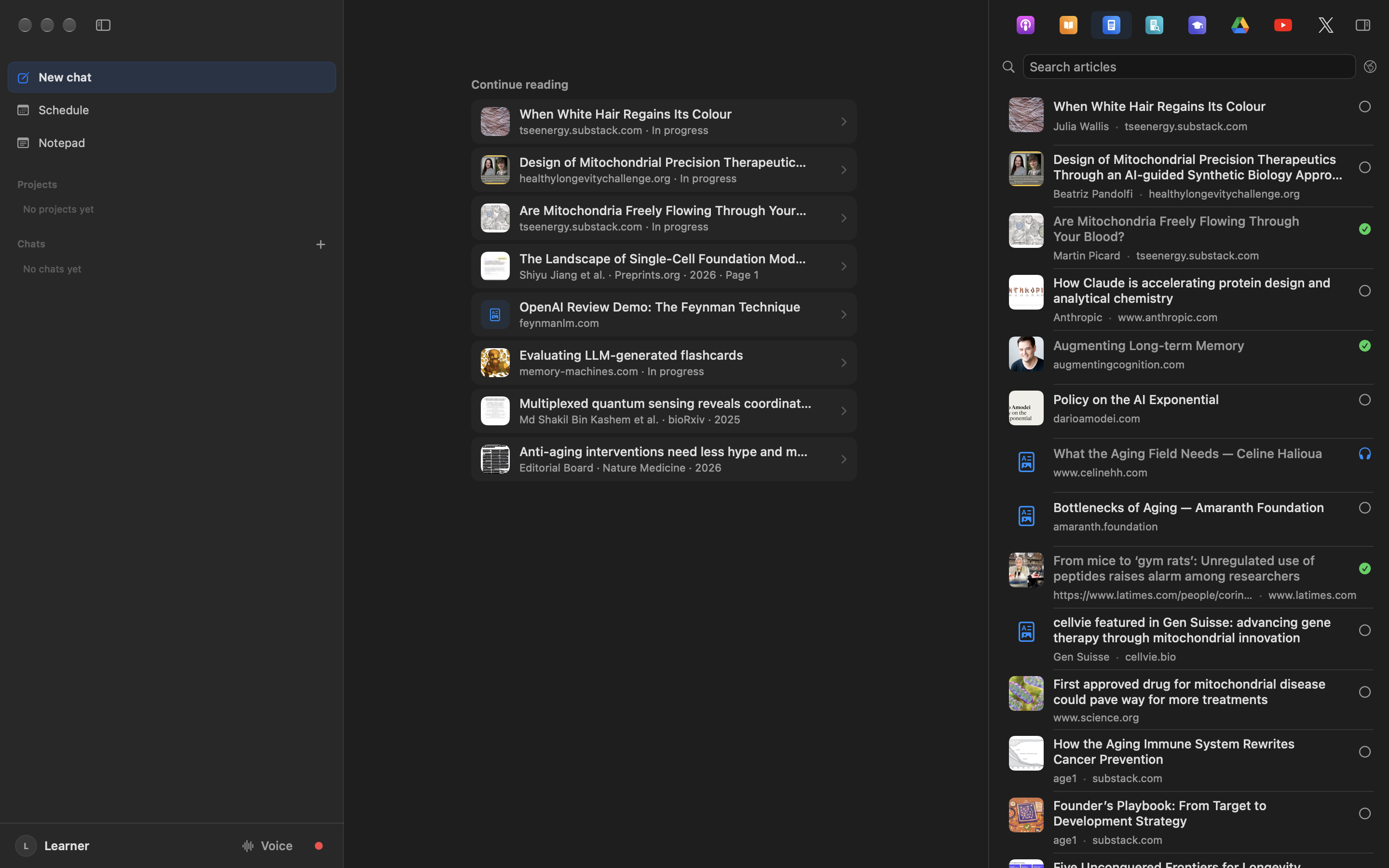
ForeverLM is a macOS app for tracking your learning sources, planning what to review, listening to articles, and using AI tutors like Claude, ChatGPT, Gemini, Grok, Edison Scientific, or the built-in Chat panel.
You work in notebooks. A notebook holds the sources for one piece of work — a topic, a person's research, a paper to review — with a chat that reads the sources you tick and a Studio that makes audio overviews, reports, cards and courses from them. Every source lives once in your library and can be in any number of notebooks, and each window opens in the notebook you last worked in. See Notebooks.
Requirements
- macOS 14 (Sonoma) or later
- Apple Silicon or Intel Mac
Install
Download the app — a notarized universal binary that runs on both Apple Silicon and Intel Macs. It checks for updates hourly and at launch, then offers each new version in the sidebar.
Drag ForeverLM into Applications and open it. While the installer is still mounted, ForeverLM asks whether to move it to the Trash; it ejects the installer and moves the downloaded .dmg there. Keep leaves it alone, and ForeverLM does not ask about that installer again.
The first launch after an update opens a What's New sheet with that release's highlights from this changelog — and, if you skipped a few releases, theirs too. ForeverLM → What's New in ForeverLM… brings it back at any time.
New versions reach beta testers first. To be one of them, turn on Settings → General → Updates → Get beta releases: your Macs are then offered each beta as well as each regular release, whichever is newer, and show the features still in beta (the Canvas and the Atlas for now). The switch follows your account to all of your Macs. Turning it off hides those features again and never moves a Mac back to an older version; it stays on the beta it has until the next regular release passes it. While a Mac runs a beta, ForeverLM → About ForeverLM and the version under Settings say so: "Version 0.123.0 Beta (192)".
First Launch
ForeverLM asks you to Sign in with Apple before anything else. Your Apple Account is your ForeverLM account: there is no separate password to create, no card is needed, and the same sign-in works on every device. Signing in starts your 7 free days of the whole app; after that, ForeverLM is $19 paid once (no subscription), in Settings → Billing. In the Mac app, Apple's sign-in opens in a sheet inside the app; sign in as you would on any Apple device and choose whether to share or hide your email.
The in-app Chat, quizzes and background AI work run on your own OpenRouter API key, billed by OpenRouter at its cost with nothing added; OpenRouter is the provider supported today. ForeverLM adds nothing to it: add the key in Settings → AI Usage, then pay models at cost or use free models, which cost $0. Connecting Claude, ChatGPT, Gemini, or Grok over MCP needs no key and nothing extra to buy.
After signing in, the Set up ForeverLM guide opens over the Studio, one question to a page. After Full Disk Access (below), its AI step is two short pages: Connect OpenRouter, then Pick your models, where one tap takes the recommended set (chat on an open-weights model run by US hosts, background work on OpenRouter's free models with a cheap backup). Choose my own opens the model the chat starts on and the one background work (transcripts, cleanup, metadata) runs on, a free model whose providers may keep what you send or a paid one, and, with a free model, an answer about meetings, which stay on a paid model unless you let them use the free one too, since a meeting's transcript holds private conversations. OpenRouter's privacy settings are in Settings → AI Usage. Continuing lets ForeverLM use the key for that work, and Settings → Background changes the model later, for text-only work and for multimodal work (work that looks at a figure or a slide), a free model included, and gives any one task a model of its own on the Tasks tab; while meetings are kept off a free model, it names the model they use. The other steps bring your first sources in, one at a time: Apple Podcasts, the browsers whose Reading List ForeverLM reads, where your papers live, then the books, courses, meetings or YouTube you tick, each on a page of its own; the last asks which AI apps you use and adds ForeverLM to each. Skip this step moves on, and Continue later closes the guide; ForeverLM → Set Up ForeverLM… brings it back at any time. The app then opens on the Space, where New Notebook starts your first notebook; after that, each window opens in the notebook you last worked in.
Safari Reading List Access
ForeverLM discovers articles you save to your Safari Reading List by reading Safari's bookmarks file. macOS protects that file, so setup asks for access before its first source step, and a later check reports it if access is still missing: open System Settings → Privacy & Security → Full Disk Access, add ForeverLM with the + button (macOS does not list it until you do), turn it on, then relaunch the app. Setup, the guide and the empty-library screen all offer a button that takes you there, and setup comes back to the same step after the relaunch.
Without that access, you can still add sources by pasting URLs, dropping PDFs, or saving to the Chrome or Brave reading list.
Using with AI
Select sources in the Library and drag them into Claude, ChatGPT, Gemini, Grok, or Edison Scientific — no setup required.
For a persistent connection where your AI can search your full library without dragging, you can optionally connect an AI assistant. Claude users can add ForeverLM as a custom plugin; it is not in the Claude Directory yet. The official ChatGPT plugin has been submitted to OpenAI and is in review; custom MCP setup remains available until it is public. Grok users can add ForeverLM as a custom plugin at grok.com/connectors; it is not in the Grok catalog yet. For always-on access, open Web Studio, choose MCP in Chat, and authorize the separate hosted connection. After MCP ✓ appears, the Mac app and Web Studio can both stay closed.
You can also use in-app Chat when you want to stay inside ForeverLM. It uses your configured API provider, saves review sessions, and links completed reviews back to sources.
Key Features
- Notebooks: the sources for one piece of work, with its chat and its Studio's audio overviews, reports, cards and courses
- Library: every source in one place, managed across the whole window (⇧⌘L)
- Schedule: assign sources to days and track review progress
- In-app Chat: ask questions and run reviews with your own API provider
- Memory: the cards you keep from your sources, drafted for you as you finish them, reviewed across every notebook or one
- Teams: a shared library beside your own, stored in its creator's iCloud; share sources, notebooks, Pages and chat transcripts by copy and work a task board together (Teams)
- Text to Speech: listen to articles and text sources with on-device or cloud TTS
- Source ingestion: automatic discovery from browser reading lists, local PDFs, podcasts
- Drag & drop to AI: drag sources into Claude, ChatGPT, Gemini, Grok, or Edison Scientific
- Semantic search: find sources by concept across your entire library
- iCloud sync: all data stored in your private iCloud container, with sync status in Settings